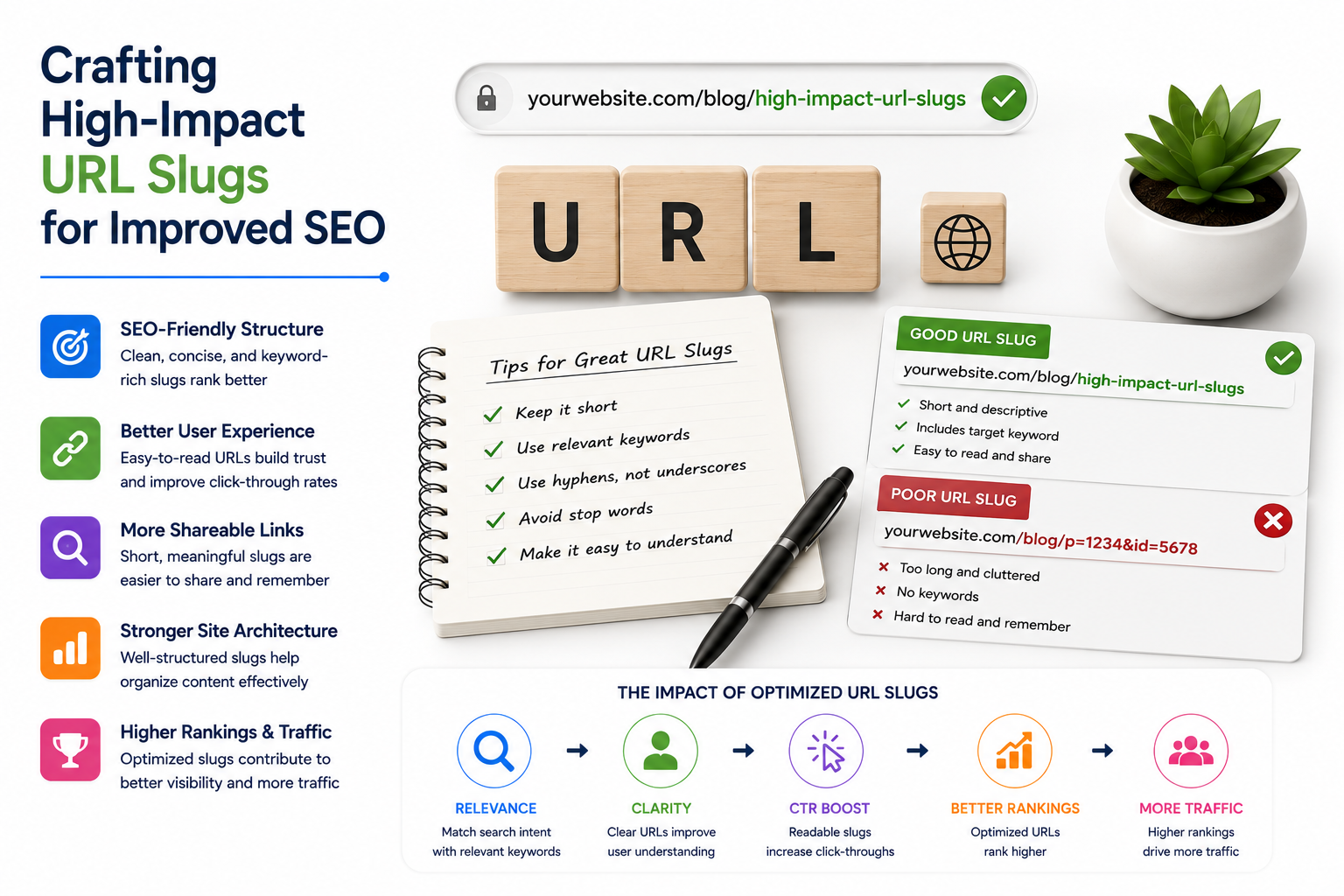
As a digital marketing agency, Marastu often receives inquiries from clients wondering why their URLs aren’t helping with SEO efforts as much as they thought. The answer might be hiding in the URL slugs, those small but crucial parts of the web address that can make or break an SEO strategy. A URL slug is the part of a URL that comes at the end, after the domain and any folders. For example, in the URL https://neilpatel.com/blog/complete-guide-structuring-urls/, the slug is complete-guide-structuring-urls. Slugs are important because they tell both users and search engines what to expect from a page.
A good slug is short, easy to read, and gives a clear indication of the page’s content. It’s like a label that summarizes the page’s topic, making it easier for users to understand what they’ll find on that page. This, in turn, can improve the user experience and increase engagement. However, a well-crafted slug also has an impact on SEO. According to Google’s John Mueller, keywords in URLs are overrated for Google SEO. Make URLs for users. He also stated that words in a URL slug are a very, very lightweight ranking factor.
The Importance of URL Slugs for SEO
While having a keyword in your URL might help Google understand the content before it crawls the page, its impact on your ranking is minimal once the page is indexed. However, there’s still value in optimizing your URL slugs. Why? Because a well-crafted slug improves user experience. Imagine seeing two URLs in search results: The first URL is clear, descriptive, and lets users know exactly what the page is about. The second is vague and uninviting, which could lead to fewer clicks.
User Experience and URL Slugs
A clear URL builds trust with your audience, and if it contains your target keyword, it can also make your page seem more relevant in search results, boosting your click-through rate (CTR). While Google may not heavily weigh URL slugs in its ranking algorithm, they still matter from a user perspective. And when you create URLs that are easy to read, descriptive, and include your main keyword, you’re helping both users and search engines navigate your content more effectively.
- When users see a clear and descriptive URL, they’re more likely to click on it, increasing the chances of your page getting traffic and engagement.
- A clear URL also helps users understand the hierarchy of your website, making it easier for them to find what they’re looking for.
- Additionally, a well-crafted URL can improve the user experience by providing a clear indication of the page’s content, making it easier for users to decide whether to click on it or not.
How to Optimize Your URL Slugs
A well-structured URL slug is more than just good SEO; it enhances the overall user experience. Additionally, clean and consistent slugs contribute to better canonicalization, helping search engines understand the primary version of your content. With well-optimized slugs, your site becomes easier to navigate, share, and remember.
- Your URL slug should be short but give a clear idea of what the page is about. The best practice is to use only the words that matter and leave out unnecessary ones.
- Long slugs can be confusing, harder to read, and more likely to get cut off in search results. The first slug is clear and to the point, while the second one is unnecessarily long and cluttered.
- Remember, a concise slug is easier for both users and search engines to understand.
Best Practices for URL Slugs
When separating words in your URL slug, always use hyphens. Google recommends hyphens because search engines treat them as word separators, which makes your slugs more readable. Avoid using underscores or running words together. Using hyphens ensures that both users and search engines can easily understand your slug and categorize the content correctly.
- Also, always use lowercase letters in your URL slugs. URLs are case-sensitive, and some servers treat uppercase and lowercase letters differently. Sticking to lowercase helps you avoid potential issues with broken links and inconsistencies.
- Lowercase URLs are easier to type, share, and manage, ensuring a smoother experience for users across all platforms.
Conclusion
Optimizing your URL slugs is an important step in improving your website’s user experience and SEO. By following the best practices outlined in this article, you can create slugs that are clear, concise, and easy to read. Remember, a well-crafted URL slug can improve your click-through rate, increase engagement, and make your site easier to navigate. So, take the time to optimize your URL slugs and watch your website’s performance improve.
By following these simple tips and best practices, you can create URL slugs that are both user-friendly and SEO-friendly. Take the time to optimize your URL slugs, and you’ll be on your way to improving your website’s performance and increasing your online visibility.
Key Takeaways
- A well-crafted URL slug can improve your click-through rate and increase engagement.
- A clear and concise URL slug makes your site easier to navigate and share.
- Always use hyphens to separate words in your URL slug.
- Use lowercase letters in your URL slugs to avoid potential issues with broken links and inconsistencies.
- A well-structured URL slug contributes to better canonicalization and helps search engines understand the primary version of your content.
Frequently Asked Questions (FAQs)
How many words should my URL slug be?
Your URL slug should be short, ideally between 2-5 words. Any longer and it may be confusing or harder to read.
Can I use underscores instead of hyphens?
No, it’s recommended to use hyphens instead of underscores. Search engines treat hyphens as word separators, making your slugs more readable.
Do I need to include keywords in my URL slug?
No, it’s not necessary to include keywords in your URL slug. However, if you do include keywords, make sure they’re relevant to the content of the page.
Can I use special characters in my URL slug?
No, it’s recommended to avoid using special characters like &, %, or @ in your URL slugs. These characters can cause issues with browsers and search engines.