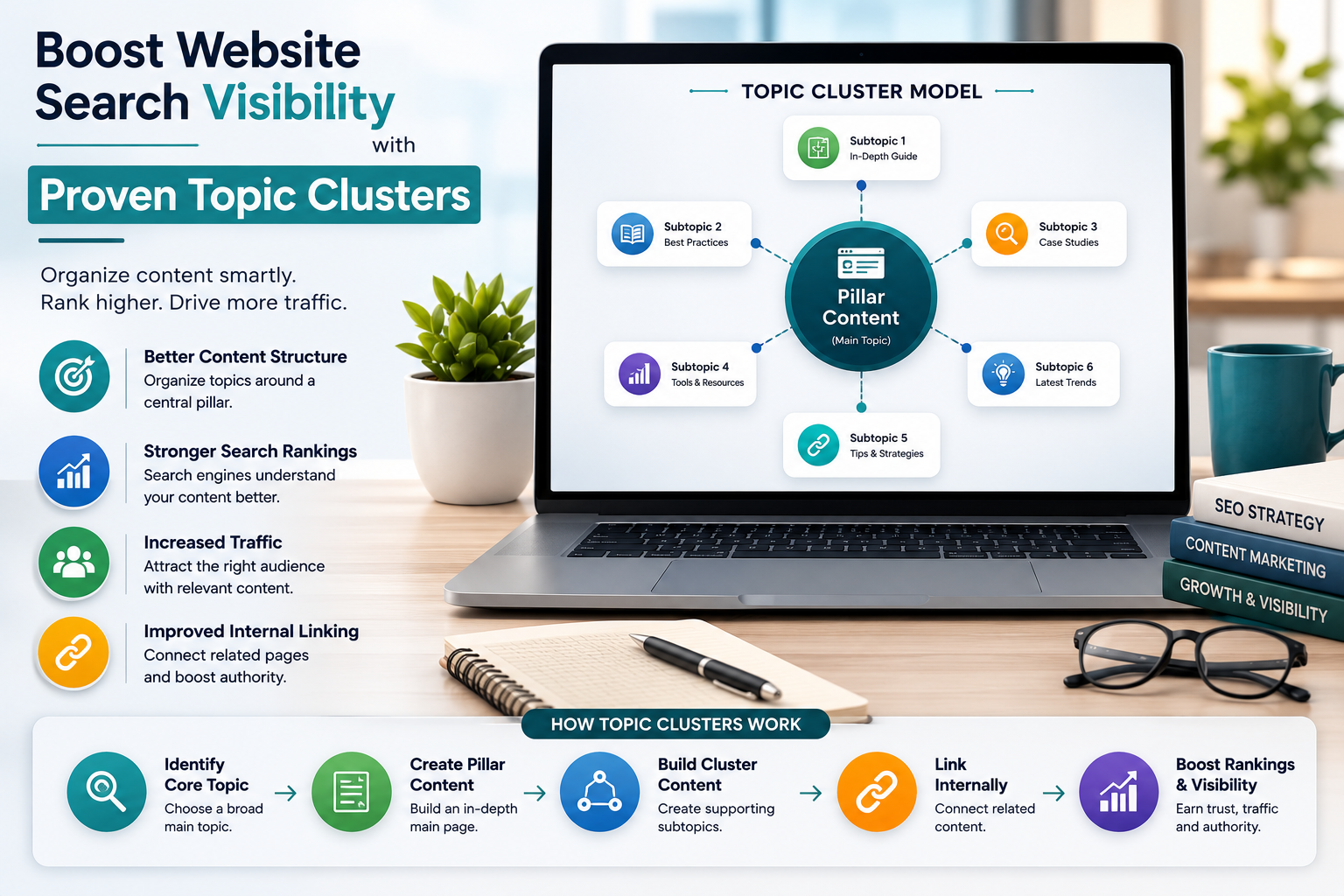
Want to turn your website into a lead-generating machine? Having a blog is a fantastic way to showcase your expertise to prospective customers while boosting your search visibility. However, coming up with fresh content ideas all the time can be tricky. That’s where topic clusters come in. By organizing your content into interconnected hubs of expertise, you’ll generate endless article ideas and create a website architecture that search engines will love.
What are Topic Clusters?
A topic cluster is a group of connected pages on a website. They consist of a page on a core topic, known as a pillar page, and a group of subpages (aka cluster pages). The pillar page links out to the related cluster pages, and the cluster pages link back to the pillar page. This strategy is sometimes called hub and spoke, with the pillar page acting as the hub and the clusters acting as the spokes.
Benefits of Topic Clusters
- Topic clusters allow you to rank for more keywords, improving your search engine presence.
- They help you build more topical authority, a measure of your site’s expertise on a specific subject.
- Topic clusters also help the search engines understand the semantic relationships between your pages, giving them more context about your site.
Why Use Topic Clusters?
Topic clusters can be used in a variety of ways, including:
- Organizing blog content around a central topic.
- Grouping product or service pages together.
- Creating knowledge base content around a specific topic.
Creating a Topic Cluster
To create a topic cluster, follow these steps:
Step 1: Brainstorm Broad Topics
Start by brainstorming broad, high-level topics related to your business or industry. These topics should be specific enough to be relevant, but broad enough to encompass multiple subtopics.
Step 2: Identify Subtopics
- Identify the subtopics that fall under each broad topic.
- These subtopics should be specific enough to be useful, but not so specific that they become too narrow.
Step 3: Create a Pillar Page
Create a pillar page that covers the broad topic and links to the subtopics. The pillar page should be comprehensive and provide a thorough overview of the topic.
Step 4: Create Cluster Pages
Create cluster pages that focus on each subtopic and link back to the pillar page. The cluster pages should be in-depth and provide valuable information to the user.
Examples of Topic Clusters
Here are some examples of topic clusters:
- Propertyable’s step-by-step guide to moving into a new house covers everything from deciding whether to move and how to sell your current home to getting the keys to your new home.
- Babbel’s comprehensive guides to learning languages provide an overview of the benefits of speaking a new language and signpost readers to valuable resources to help them on their linguistic journey.
Best Practices for Topic Clusters
To get the most out of topic clusters, follow these best practices:
- Use a clear and concise language in your pillar page and cluster pages.
- Make sure your pillar page and cluster pages are well-organized and easy to navigate.
- Use internal linking to connect your pillar page and cluster pages.
Conclusion
Topic clusters are a powerful way to organize your content and improve your search engine presence. By following the steps outlined in this article, you can create a topic cluster that showcases your expertise and attracts more leads.
Remember to use clear and concise language, make sure your content is well-organized, and use internal linking to connect your pillar page and cluster pages.
By following these best practices, you can create a topic cluster that drives real results for your business.
Key Takeaways
- Topic clusters are a group of connected pages on a website that focus on a specific topic.
- The pillar page is the central page that covers the broad topic and links to the subtopics.
- Cluster pages are in-depth pages that focus on each subtopic and link back to the pillar page.
Frequently Asked Questions (FAQs)
What is a topic cluster?
A topic cluster is a group of connected pages on a website that focus on a specific topic.
How do I create a topic cluster?
To create a topic cluster, start by brainstorming broad, high-level topics related to your business or industry. Then, identify subtopics that fall under each broad topic and create a pillar page that covers the broad topic and links to the subtopics.
What is the benefit of using topic clusters?
The benefit of using topic clusters is that it helps you rank for more keywords, improves your search engine presence, and builds more topical authority.
How do I track the performance of my topic cluster?
To track the performance of your topic cluster, use analytics tools to monitor your website traffic, engagement, and conversion rates. This will help you identify which pages are performing well and which need improvement.